Socks that Don’t Suck

When most of us hear the word technology, we think silicon, batteries and things with glowing apples on them. We don’t think socks–the tubular hosiery, less the infusion of nylon 70 years ago, seem relatively innovation proof. Not so, says Ministry of Supply. The same folks who are trying to reinvent the dress shirt are bringing to bear the latest in material technology and design to the lowly sock.

Here is some of the juice that makes the ATLAS sock so special:

  • Construction of 40% recycled polyester infused with carbonized coffee, 40% cotton, and 20% elastane. The blend is designed to be highly breathable and wicking. The coffee is an odor retardant,  important for a sock with such a high synthetic composition.
  • The sock underwent strain analysis to find out where our feet flex so the sock’s design moves with, not against our foot’s natural flexion points, thereby avoiding bunching and sagging.
  • MoS conducted “pressure mapping,” which helped them “visualize how you apply pressure and where you need extra support in your socks.” Areas are reinforced according to those pressure points.
  • Thermal mapping allowed MoS to see where hot spots most frequently occur and provide additional ventilation accordingly.

MoS told CNET that one of their biggest challenges was finding a facility that could handle the 3D knitting process necessary to manufacture the sock per their design. MoS reports that they “landed on one of the most advanced textile mills on the planet, who works with brands like Patagonia.”

The sock, like their shirt, is a Kickstarter project. They have already raised almost $70K of their $30K goal. A $28 pledge will buy you two pair of socks (loafer and full length version are available). Not cheap, but not ridiculous either. And if the socks live up to their claims, it could be a very worthwhile investment.

One thing MoS did not stress is the durability of the sock, which is a big question mark for us. Great fitting socks are, well, great. But if you tear a hole in them in your first few wears, they’re kinda useless. The resistance to bunching might help avoid strain that leads to holes, but we’re not sure.

We’ve said it once and we’ll say it again, but if designers and engineers exerted a fraction of the creative energy normally reserved for electronics to everyday items like socks, our everyday would be a lot smarter than it currently is. We applaud MoS for thinking outside the LCD box.

The Fun, Mobile Path to Enlightenment

For the stressed out Luddite, nothing beats meditation. Sit down, focus on your breath and let the peace ensue. No equipment or wires–just your thoughts, breath and butt. However, for the more technologically disposed, a new product called PIP might provide a great way to still your frazzled nerves.

PIP is a tiny Bluetooth enabled gaming device that allows you to manage stress. PIP achieves this through playing games on your iOS or Android mobile devices. The games reward the physiological state of relaxation as measured by the PIP device. These games can be played solo or against someone.

While stress might be induced by a psychological reaction, the manifestation of stress is quite physiological as the PIP creators describe:

When you are in a stressful situation your body’s flight or fight response is activated. As a result, blood is rushed to the periphery of the body which causes your sweat glands to activate. This activation changes the conductivity of your skin and is referred to as the Galvanic Skin Response (GSR).

PIP measures your GSR and the games provide a fun way to bring your stress levels down. Games include “Relax and Race”–a game played with another person, where the person who “out-relaxes” the other wins the game.

relax-and-race

PIP is a Kickstarter project by a Dublin-based company called Galvanic. They have raised $33K of a $100K goal with 25 days left to go (in other words, if you like PIP, support them now!).

PIP might strike some as a bit overly complicated. Why not just sit and meditate to relieve stress? But for longtime and aspiring meditators alike, the act of quantifying relaxation is much easier said than done. An hour of meditation might leave us feeling more agitated then when we began.

We realize the Buddha was not staring at his Galaxy S4, playing a game with flying dragons on his way to becoming an enlightened being. That said, we suspect the state of enlightenment has a correlative physiological state that can be induced and monitored. For those of us lacking a Bodhi tree to hang out under for a few months, the PIP might be a good tool achieving that state sooner than later.

Amina Speakers: The Best Product You’ll Never See

In the coming months, we will be highlighting products and services we use in the LifeEdited apartment. Today, we’re “looking” at the Amina Invisible Speakers. 

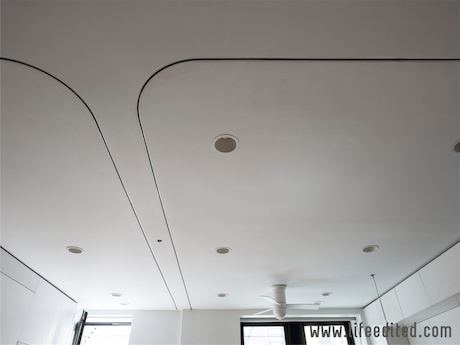
With the living room of the 420 sq ft LifeEdited Apartment doubling as entertainment area, there was a need for quality loudspeakers. The perfect solution was found in a loudspeaker that becomes part of the finished ceiling, actually completely invisible and covered with regular drywall compound and paint. Impossible you say. No, it’s not!

The latest audio trend is to hide loudspeakers rather than treating them as a “must see” piece of furniture, especially with 5.1 or 7.1 surround sound. Current invisible speaker solutions created by Amina Technologies, a leading speaker developer and manufacturer from the UK, actually affords not only very good sound reproduction, but even better, smoother coverage throughout the whole space. The sound source is hard to locate, almost ethereal, and completely undetectable by the eye. Even while listening intensely, without any visual cue as to where the speaker is installed, it is very hard to locate them, almost impossible. The speaker makes a great conversation piece to boot.

ceiling
find the speakers

In the main living space, a stereo pair of Amina Technologies’ AIW5X plaster-over loudspeakers were used. They work on the same principle as a musical instrument, combining modern electronics with acoustical engineering. Using a tuned “sound board” and an exciter, and connected to a Marantz NR1602 receiver (or any receiver/amplifier), they create sound in a most unusual way. Through having many minuscule vibrations sum, much like on a soundboard of a guitar or violin, and fill the room in all directions with full sound. For purposes of keeping bass frequencies out of the walls and ceilings, a small, hidden subwoofer provides the deep bass, as to not bother the neighbors.

For the bathroom we still wanted to maintain the stereo quality of sound while having little space, so an AIW2X speaker was used to provide an acoustically summed stereo sound. These panels reproduce both the left and right speaker channel mechanically using dual “exciters”, and although there is no “stereo spread”, there certainly is sense of openness and timbre that feels like there is definitely a stereo pair somewhere.

All in all, Amina afforded the solution that satisfied both the need for quality sound, as well as the aesthetics that we were looking for. They kept the amount of visual clutter on the finished ceiling down to just the moving wall tracks and light fixtures, and actually have enough sound power to make it sound like you have a band in the room.

Costs for Amina Invisible speakers range anywhere from $750 to about $2500 dollars for the loudest solutions (plus of course the level of wall or ceiling finish you require will be extra, but when taking the build or remodelling in consideration, the finishing is part of the big picture already). They are great for anything from the dining room to that “hidden Home Theatre”, or even to put the tunes on our micro dance floor. They are available worldwide through authorized dealers and distributors. Visit www.aminatechnologies.com.

National Day of Unplugging is Coming Up. Are You Up to Celebrate?

March 1st is National Unplugging Day, a day to power off phones, computers and any other device that needs plugging in and a strong connection. The project is the brainchild of Sabbath Manifesto who promote the idea of a, gulp, weekly technological break or Sabbath.

We know that for some this idea does not sound too monumental. You rarely check your phone, inbox and love the feel of paper on your fingers. For some of us though–and this author includes himself in this category–the actual implications of unplugging are daunting: We only have cell phones, our work centers around our computers, we read on eReaders, our media is streamed. To detach ourselves for even a day sounds like a big deal.

There is a growing body of evidence that our hyper-connected world is taking a toll on our happiness. Last year, a Standford University study found that young girls who are heavy multimedia users are less happy and less socially comfortable than their offline peers. There is other evidence to suggest technology use is making us a more distracted society. One survey reported in the Wall Street Journal found that 60% of workers spend over an hour of every workday on technological distractions. (Note: There are also studies with positive correlations between technology and happiness).

Either way, if you’re in the camp who: A. are regular users of technology, and B. think that cutting back on heavy use of technology might not be a bad thing, then laying off technology for one day a year shouldn’t sound like a stretch. When that day is through, you can evaluate if a weekly Sabbath is in your future.

If you’re not sure what you’ll do, you can check out Sabath Manifesto’s Ten Principles, which are no-tech pastimes to fill the hours otherwise texting, tweeting and so forth. They are:

  1. Avoid technology.
  2. Connect with loved ones.
  3. Nurture your health.
  4. Get outside.
  5. Avoid commerce.
  6. Light candles.
  7. Drink wine.
  8. Eat bread.
  9. Find silence.
  10. Give back.

In other words, this is not a day to go to the movies and shopping (we’re sure these principles can be adapte for gluten-intolerant and non-drinking folks).

The fact of the matter–despite what we might think–is that the world will not fall apart if we’re offline for a day–especially if we give our wives/husbands, bosses a heads up. What do you say? We’re in. Are you?

If you’re already observing a tech Sabbath, we’d love to hear how it’s going. 

Opinion: Do We Need Anything From the Consumer Electronics Show?

If you’re even remotely a techie, you’re aware that the Consumer Electronics Show (CES) was held in Las Vegas this week. The TVs, game consoles, phones, tablets, and phablets (no, we’re not making that up) of tomorrow are there on display today.

We love the things technology makes possible. We love that our mobile apps do the duty of tons of useful tools. We love that Spotify and Netflix allow us to ditch our CDs and DVDs while giving us access to far more media than we could ever acquire in a lifetime. We love how our eReaders allow us to take our libraries anywhere. All of these things depend on the kind of hardware seen at CES.

The consumer tech industry has a lot to do with Moore’s Law, which says that the number of transistors that can fit on an integrated circuit doubles every two years; it’s a law that has held true for the last 50 years and shows no sign of abating. It has made technological advances occur at breakneck speeds–tech that was state of the art five years ago is considered garbage today. No other industry can say that–not cars, furniture, energy…nothing.

But what about us, the users? Can we keep up with the number of choices and options available? Are we better off with these choices at all?

An insightful article by Treehugger’s Jaymi Heimbuch entitled “CES 2013: The World’s Largest Electronics Tradeshow, Buddhism, and the Illusion of Choice,” waxes about the existential implications of CES. She writes:

We produce too much stuff to the point of redundancy and even ridiculousness. The consumer electronics industry is bound up in this truth: the myriad choices we are given as consumers of gadgets is pure illusion. Instead of freedom through modern gadgetry, we are unwittingly made increasingly unhappy by it.

We’ve explored this philosophical terrain before, asking how less choice might be the route to greater happiness, and conversely how greater options can often make us miserable. While we aren’t at CES ourselves, we imagine the available choices could paralyze someone who just wants a new phone.

While sitting out the tech arms race seems like the way to go, many of us depend on technology and appreciate its applications. As such, we’d just assume our tech be faster, lighter, more efficient, have better sound and display and so forth. We prefer our Samsung Galaxy III to a Palm III. These newer, better devices and all the things we can do on them would not be possible if companies–the same ones on display at the CES–had stood still technologically.

But how do we stop ourselves from stepping on a technological hedonic treadmill, where we get the fastest, thinnest, sexiest device, only to start lusting after the next model released a couple months later?

In our previous post on choice, we looked at the website The Wirecutter, which gets experts to declare a best device in any given category–e.g. best laptop, SLR, external harddrive, etc. If you take their advice, you have the opportunity to eliminate a lot of choice as well as benefitting from their expertise.

One of its contributors, Brian Lam, wrote an opinion piece in the NY Times called “Knowing When It Pays to Upgrade Your Gadgets.” It’s a clearheaded look at how to evaluate if you actually need a new piece of tech hardware.

Lam’s conclusion is basically different people have different tech needs. A graphic designer will need to replace her computer more often than a plumber. He does say that some things, like tablets, seldom need replacement for anyone. He also gives this overarching statement, which, from a tech writer, sounds pretty sage:

No one has ever regretted waiting as long as they can to upgrade their technology. We’re a nation of shoppers, tempted to buy the best at every turn. But I’ve found that the best way to avoid a premature upgrade is to remember what you might be giving up: a trip to a tropical getaway, a new suit or perhaps a down payment on a new bed that will help you sleep better. That kind of context makes it easier to pause and realize the grandest truth with upgrades: If it isn’t broken, stolen or lost, maybe you don’t need a new one just yet.

How about you? How do you balance your technological needs with the endless array of upgrades, faster models, etc.? We’d love to hear your opinions.

image credit: Andrew Harrer for Bloomberg

20 Million Songs for $10 (a Month)

In the coming months, we will be highlighting products and services we use in the LifeEdited apartment. Today, we’re looking at the streaming music service Spotify

Do you remember going to the CD store (or for some, the record store)? You’d rifle through the aisles and their indexed rows, peering at the tall, half-empty cardboard boxes, squinting to see which album was in front of you; the more artistic bands wouldn’t say, so perhaps you’d have to unearth the album from a tight stack. Then you’d fork over $15-20 for the disk itself–and this was 10-20 years ago. Then you’d bring the disk home, listen to it, enjoy five of the twelve songs then store it on a CD tower or bulky wallet.

For most of us, the iPod ended the CD era. It enabled us to load tons of albums in something that fit in our pockets. No hard-to-open boxes, esoteric album covers, CD towers or filler songs. Slowly-but-surely, we built our music libraries via converting CDs, purchasing on iTunes (which at $10/album or $.99/song was still a lot cheaper than CDs) or downloading through shadier channels.

But the iPod still locked you into storing your MP3’s on a harddrive. We acquired gigs and gigs of music on our computers, hogging RAM and creating confusion when trying to trying to access music.

In keeping with the “access over ownership” ethos, we chose Spotify as the music purveyor at the LifeEdited apartment. Spotify is a web-based service that allows you to have streaming access to a catalog of 20 million songs. With a membership, you can sort, bookmark and make playlists with any music in the catalog. Should you choose, there’s a social aspect where you can see what your friends are listening to as well as recommendations from tastemakers.

Spotify is available in three versions: Free, unlimited and premium. Free is, well, free, but has ads and a ten hour limit for listening each month (sound quality is not-so-great in our experience). Unlimited is $5/month and allows you to access the full catalog on your laptop or desktop without time restrictions or ads. Premium–the service we use–is $10/month and gives access to any web-enabled device, has improved sound quality and allows offline listening to your playlists–an important feature if you’re trying to replace an iPod.

If this seems like a bit of money to pay for a service, consider most of us were okay buying twelve or more CDs or iTunes albums a year at $10-15 each. After collecting these albums over the course of a few years, we’d still have a collection that was a tiny fraction of what’s available on Spotify. We’d also have to manage the CDs themselves or the storage needs of the MP3s.

The biggest drawback to Spotify is portability. You can’t load it onto a normal iPod (you can use it with the web-enabled iPod touch). This is less and less an issue for most people, who use a normal iPod only for working out and whose phone is their main music device.

Spotify also takes pains to make sure only one person is listening to an account at a time. In other words, you and and your wife can’t listen to your premium account on two separate computers at the same time.

Audiofiles might find the sound quality lacking on Spotify and may choose to stick with CDs, high quality MP3s or even vinyl for that reason. However, for the great majority of music listeners Spotify works great and provides an immense library of new and old music without the hassle of storage.

Devotion to this Guru Saves Travel Time

In the next few days, many of us will find ourselves taking to the skies en route to family fun (or obligation). With winter weather and crowded airports to navigate, there are a host of variables that can add hours and stress to your travel plans. A free app called GateGuru for iOS, Android and Windows Phones takes a lot of the mystery–and headache–out of air travel.

GateGuru has several functionalities that allow you to confidently venture forth using the most current information about your flight and airport. One is the JourneyCard, which shows “high level” information like airport weather and scheduled departure times.

The FlightCard shows specific up-to-date info about your flight such as departure and arrival times, gate info, baggage carousel info and even estimated security wait times. This function is a great one-stop-shop where normally we call the airline for flight current flight info, write down–then subsequently lose–arrival time and terminal details, and have no idea how long security is until we arrive at the airport.

Other features include a list of amenities at your airport like restaurants and shops (spoiler: most of them are overpriced and not that good). GateGuru has a partnership with Avis rental cars, allowing on-the-fly bookings with that company via the app. And GateGuru will show your travel-stats–miles traveled, frequent-flyer info, etc.

Part of living an edited life is eliminating unnecessary steps wherever we can. While some of us find a certain serendipitous glee spending 10 hours in an airport waiting for our flight to leave, meeting new friends, eating Quiznos and so forth, most of us would rather be doing something–anything–else. GateGuru holds the promise of editing our travel times this holiday season and beyond.

Via Netted by the Webby’s

Sign PDF’s, Ditch the Fax

Has anyone recently asked you to telegram a message because they want to make sure it gets to you safely? Perhaps a carrier pigeon or pony express? Of course not. But has someone asked you to send a signed document via fax machine? Probably so.

Different people have different tactics for getting around the Dodo-in-waiting that is the fax. For some, sending a fax involves printing the document, signing it, scanning that document, then sending that scanned version via email (you probably save the signed paper document “just in case,” creating more paper clutter). Or some of us keep an eFax number, so we can trick people into thinking the scanned PDF is coming from a real live fax machine…suckas! Except these numbers often cost us $10/month. Any way you spin it, this process is a pain that uses way too much time, paper, money and equipment–all to achieve a questionable level of security.

There are now many ways to sign PDF’s, Word Docs and any other signable document without scanning, paper, expense or hassle.

There are a number of fancy signers that create digitally encrypted signatures, many of which cost upwards of $15/month.  While these might be great for lawyers and mobsters who have some serious security issues, the LifeEdited team has been using the pretty budget PDF Signer app for a while now with great success. For $10, it allows your Mac to open any document and overlay your digital signature, which can either be made by scanning your signature or even taking a photograph. It also allows you to fill in boxes with standard text.

Options for other devices/operating systems:

  • LifeHacker recommends DocuSign Ink for iOS. This free app allows you to sign documents with your finger as well as fill in text.
  • For Android, there’s a highly rated app called Fill and Sign PDF Forms, which allows you to, um, fill and sign PDF forms ;-).
  • PD Fill works for PC’s and comes highly recommended by CNET. $19.99.

Get Ripped, Clear Clutter and Boogie Down

Many of us still lug around our CD collections despite the fact we stream our music or listen to MP3’s. We can’t bear to rid ourselves of these little mirrored disks that store music, memories and money. So we burrow them in the recesses of our closets or proudly display the jewelboxes in our living rooms–vestiges of days when visitors could size you up based on your Kraftwerk collection.

Though media storage is a valid form of decoration, the fact is most of us can carry our music library in our pockets nowadays. And while many of us have intentions galore for converting our CD collections into digital formats, the gap between intention and action is often a vast one.

Enter RipDigital. The service takes your old CD’s and converts them into one of three digital compression formats: 192kbps, 320kbps or Apple Lossless (ALAC) and FLAC formatting–basically good, great and audiophile qualities. Prices are $.99, $1.29 and $1.49 per disk respectively.

Send your CD’s to RipDigital and they will send the files back on a DVD or your device like an iPod or external harddrive. They also sell hardrives ($134-274) and iPods ($269-439).

If the prices sound high, consider that an iTunes song runs you around $.99. For a couple hundred bucks, you could convert a pretty sizable collection, adding tons of music you already like to your library as well as saving space and clearing clutter.

We realize that digitally compressed music, for some very discerning ears, doesn’t quite have the richness of CD’s (or vinyl, some would say). For these people–e.g. Gary Chang whose tiny house includes a wall of CD’s–keeping their CD’s and vinyl makes sense. The rest of us, who don’t do anything with our CD collections, we must concede that music that is not listened to has really low fidelity.

image via flickr/misterjt

Get Your Masters in Walkonomics

No form of transportation is more edited that walking. Tires are your shoes. Parking is your chair. Fuel is dinner.

We’ve looked at Walkscore.com in the past. The site is a great resource for assessing a neighborhood’s walkability, showing proximity to various pedestrian-friendly amenities like restaurants and public transport. What the site might not convey is a comprehensive picture of what that walk would look like. Is the walk a stroll in the park or an advance toward enemy trenches?

A new site called Walkonomics tries to fill in these gaps in knowledge. Rather than relying on statistical information, Walkonomics crowd-sources information about particular streets. It looks for information like “road safety,” pavement and “fear of crime,” as well as intangible but important qualities like “fun and relaxing” and “smart [the site makers are English] and beautiful.”

The site reminds us of Waze, which crowd-sources traffic data and gives you corresponding directions. Walkonomics is not nearly as robust as Waze, nor does it appear to have a mobile app, which would be indispensable for this type of information–helping you to decide on-the-spot whether to walk down that dark street or not.

The site is pretty beta and mostly covers major urban areas like London, San Fran and NYC. Even the latter city, arguably the most walkable in the US, has huge gaps in information. That said, users can take it upon themselves to enter data about their particular streets and beef up Walkonomic’s data.