Clean Up Without Toxic, Space-Hogging Cleaning Fluids

The e-cloth is a cleaning cloth that cleans virtually any surface without any cleaning fluids. The cloth has 1.6M threads/inch as opposed to most microfiber cloths, which have between 90K-200K and standard cloths, which have 25K-75K. The high density traps dirt, oil, dust and most any other particulate you put in its path. E-cloth also says the cloths remove 99% of bacteria from hard surfaces.

The company cites another interesting claim, saying:

‘Women who work at home have a 54% higher death rate from cancer than women working away from the home.’ A 15 year study concluded that it is directly linked to the toxic household chemicals in the home.

Eliminating cleaning products, they suggest, is a great way of reducing the presence of those chemicals (we suspect it’s healthier for men too).

In terms of durability, the company guarantees the cloths for 300 cleans and says that if you wash it once a week, a cloth should last you about six years.

All this would be a bunch of marketing BS if the things didn’t work. But they do. We picked up one of their “Kitchen Packs” from Green Depot for the LifeEdited apartment, not knowing what to expect.  They work great, cleaning glass, chrome and counters equally well, all without cleaning fluids.

Beyond the lack of toxicity and durability, they eliminate a cabinet full of various cleaning products, saving space and creating less waste.

We often think of technology as something applied to faster laptops and hydrogen fuel cells, but sometimes it’s the mundane improvements to things like dress shirts and rags that really make a difference in the way we live.

Do you have other products that streamline your home? Let us know in our comments section.

Bottoming Out on Digital Media? Try a Digital Detox

Yes, it has come to this: “Digital Detoxes”–offline stays for those of us bottoming out on information overload. While we’ve looked at tools for combating the attention span crisis in the past, for many of us, the temptation to go online makes these tools insufficient for quelling information overload.

It seems evident that the pervasiveness of online use is reaching a saturation point.

  • A 2009 study found the average American spends 13 hours/week on the internet, not including email; 14% exceed 24 hours/week. Numbers that are surely getting bigger.
  • A Google study found that 72 percent of those surveyed use their smartphones while consuming other media and that 1/3 are on their smartphones while watching TV.

In one way shape or form, most of us are looking at glowing boxes for a good portion of our waking hours, including our vacations.

Young Island at St Vincent’s

A tour company called Black Tomato offers a nine day digital detox in the remote Caribbean islands of St Vincent’s and the Grenadines for $3800 (includes airfare from London and accommodations). The company strips you of your devices and offers a life coach to help you with the detoxification process.

Less remote, less financially taxing, is The Digital Detox, which offers personal and corporate retreats in Ukiah, California. For $450-950 for three, all-inclusive nights, guests surrender all of their devices, including watches. Days are spent hanging out at the hot springs, eating vegetarian cuisine and doing yoga. Instead of chronically their trip on their phones, are encouraged to journal.

In an interview with Buzzfeed, The Digital Detox founder Levi Felix “When people go on vacation and have the intention of unplugging, studies show that they spend 30% of the time working or on some kind of tech anyways” He even said that “people find themselves going on a camping trip, grabbing their phone and going on old emails,” even when there’s zero cell coverage.

In other words, it’s not enough to go off-grid. Many of us need our devices pried from out hands to get completely offline.

What do you think? Does being online represent freedom or repression? Is being online all the time–even on vacation–necessarily a bad thing?

4 Products that Disappear After You Buy Them

A recent article in the NY Times called “The Cult of Disappearing Design” reported on a growing movement toward invisible home furnishings. The “all-invisible aesthetic,” according to the article, “aims for a higher-minded goal: creating unified spaces that flow from room to room and place to place.”

They featured a couple items we’ve had here in the past like the Folditure “Leaf” Chair and the Bedup hiding bed. They also featured the Fisher & Paykel DishDrawer which is used in the LifeEdited apartment.

While there is an inherent challenge showing the invisible, we thought we’d add a couple items not included in the Times’ list.

1. Amina Invisible Speakers

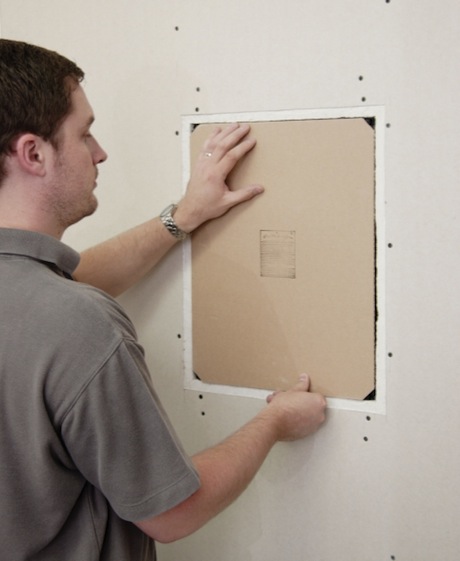
We used Amina high performance invisible speakers in the LifeEdited apartment. Their sound is easy to appreciate, though their beauty is not. The above picture has two large Amina speakers in the ceiling, but you’d never know. They are built into the drywall.

2. Induction Cooktops

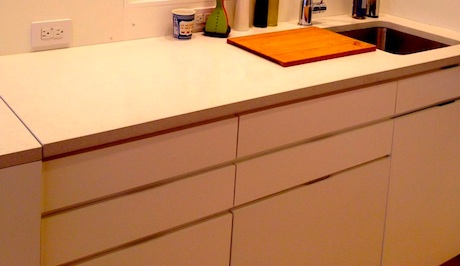
In the LifeEdited apartment, we use Fagor portable induction cooktops, which are invisible in that we can put them in a drawer. Built in models are even more sleek (there’s a Fagor model pictured above). They sit virtually flush with the counter. They only conduct heat with ferrous metal, so they are cool to touch, which makes allows them to be used as additional counter space. They are also 12% more efficient than electric radiant burners.

3. Integrated Kitchen Appliances

While the Times mentions Fisher & Paykel DishDrawer as a disappearing design, there are many dishwashers and refrigerators on the market today are available as “integrated”–i.e. a panel that matches the rest of the cabinetry can be affixed to the front of the appliance. Sorta pictured below is the DishDrawer in the LifeEdited apartment. IKEA makes an integrated dishwasher for about $699. Panels cost extra.

For whatever reason, integrated fridges are more expensive. We used the Sub-Zero 700 BCI stacking drawer fridge, which retails for $3500 and up.

4. Blanco Crystalline Sink

The Blanco Crystalline Sink incorporates such a simple idea: cover you sink when you don’t need it, creating a cleaner look and more counter space. The sink comes with a removable glass cover (available in white or black). Unfortunately, due to code regulations a super-cool retractable faucet is only available outside the US.


More Mobile Living: Video of Couple’s DIY 3 Story School Bus

This video from Fair Companies takes an extensive tour of Richard and Rachel’s school bus home. Unlike René Agredano and Jim Nelson’s mobile living we looked at yesterday, this project is decidedly DIY; most evidenced by the decapitated VW Vanagon that makes up the top 2 stories. Just like the latter couple, Richard and Rachel tout the advantages of living mortgage-free as one of their principle motivations for living this way.

They also liken the project, which has taken them about 6 years so far, to the cardboard forts kids make. They fabricated most of their furniture and even included things like a projection “room” on the second floor. They claim there’s a level of connection and imagination that comes from a hand-built home not usually found when you buy something already built.

There seem to be some concessions to this hacker home, e.g. no plumbing; they use grey water to shower and wash their dishes every few days. They also don’t have RV status, which I suspect is why they didn’t specify their last names or location (though the bay they look upon looks suspiciously like San Francisco Bay).

The upsides they report are many. The have a minimal carbon footprint, using a composting toilet, solar power and even a solar-powered fridge. The bus only cost $12K to build, including a $1200 fridge. They live debt free with only $100/month living expenses. And they enjoy freedom that comes from not living to pay for their lifestyle. This is a common theme from yesterday’s couple and the Tiny House Family we looked at last week.

Do you think you could live on the road like either one of these couples? Have you? What was your experience? Is this something that can be done for longer than 6 years or is this more of a phase? Could a family live like this? Is a mortgage inherently a bad thing? We’d love to hear what you think in our comments section.

Cut Paper Clutter and Future-Proof Documents

A thoughtful handwritten card is great, but most paper we deal with is just annoying, clogging filing drawers and neural pathways alike. Justin Klosky from OCD Experience gives tips how you can convert your paper clutter and create digital organization that will allow you to access documents for many years to come. 

Reduce Paper/Utilize Technology

If you have more than one filing drawer in your home and small business this applies to you!

It is time to O.C.D. (Organize & Create Discipline) and rid yourself of papers in your entire life. To prevent this tip from becoming pages of instructions, simply start going digital today. We won’t discuss the prior work you need to do, so if you don’t already have one, buy a scanner, an external hard drive and a paper shredder. It will be worth every penny.

Simply start scanning ANYTHING that you truly think you will need to reference again and shred the originals. Create a simple folder structure on your computer like you would a filing cabinet and utilize additional folders for each category you will be scanning documents for. Common folders will be: Business, Children, Health, Home, Insurance, Money/Taxes, Receipts, Resumes.

Lastly setup your external hard drive to back up your computer anytime a file has been altered and added. This will also prevent you from losing your data.

Organize: Gather all of your paper documents you want to take the time to digitize.

Create: Create a simple folder structure to store all of your digital files.

Discipline: Whenever a document comes in that needs to be scanned and filed make sure you do it daily, if not weekly. Never let something sit longer than a week or it will eventually become a chore!

Reduce Paper/Utilize Technology Tip: Only scan what you truly need in your life and shred the rest. This will eliminate paper pile ups and will allow you to live in a paperless world as effectively as possible. Keep all hard copies of certified documents.

Get Rid of Dead Spots and Duplicates in Your Music Library

We tend to focus a lot on durable good clutter, but increasingly digital clutter is the nuisance du jour. While you might not need to get a storage unit to house it, it’s still a pain. It hogs RAM slowing down our computers, it makes us get external hardrives or increase our cloud backup for files we don’t need and most importantly, it makes finding files we do need exceedingly difficult.

One of the primary repositories of digital clutter is the music collection. Perhaps you imported a library from somewhere (in a highly legal manner) or you—heaven forbid—pressed “Add File to Library” more than once on iTunes. Suddenly, you have 5 files for “Sympathy for the Devil”—one listed under “Rolling Stones,” another under “The Rolling Stones” and a few as tracks 4, 6 and 11.

A service called TuneUp takes care of this issue, zapping duplicates as well as cleaning up your music library in other ways.

Tuneup offers a few services available bundled or à la carte:

  • Clean your library by fixing mislabeled or missing song information (like “Track 01” or “Unknown Artist”) using waveform recognition.
  • Scan your entire music collection and fill in missing album artwork.
  • Find and remove duplicate music files from your music library using waveform recognition.

The full suite is available for $40 annually/$50 lifetime (includes one computer transfer). All services are available à la carte for $20 annually/$30 yearly. Tuneup is available for Macs and PC’s and works with both iTunes and Windows Media Player.

While this might strike some as steep, consider that digital media is an asset you might keep for a while. And just as you might have bought a CD-rack once upon a time, spending a few bucks to organize your MP3’s might be a worthwhile investment.

2 Lists To Live By

How often have you checked your inbox or the web only to realize it totally short-circuited an important task you were engaged in? How often have incoming calls, texts and/or emails undermined your level of presence with the people you were spending face-time with? How often has your desire to do everything left you too confused to do anything?

If the above problems beset you, strategic adviser Peter Bregman has a simple way to keep on track and avoid distractions. He suggests making and abiding by two lists; he recommends checking them throughout the day. The lists are broken down into two simple categories:

  1. Your Focus List (the road ahead)
  2. Your Ignore List (the distractions)

Though he doesn’t use the phrase, Bregman is describing life as opportunity cost. In order to have certain things (the road ahead), we need to turn down or ignore many others (the distractions). In order to be present with one person, you have to ignore many others. In order to do one thing really well, you have to not do infinite other things. There is a reason no one talks about Picasso’s novels–he chose to be a painter.

What’s unique about his suggestion is the use of active ignorance. It’s not enough to find out what’s important–we have to actively avoid the things–be they communications, tasks, pursuits, purchases, etc–that aren’t aligned with what’s important.

Bregman’s suggestions run counter to our culture that promotes all information all the time. But he’s emphatic about the importance of saying no and the heavy toll of unlimited inclusion. He writes:

Never before has it been so important to say “No.” No, I’m not going to read that article. No, I’m not going to read that email. No, I’m not going to take that phone call. No, I’m not going to sit through that meeting.

It’s hard to do because maybe, just maybe, that next piece of information will be the key to our success. But our success actually hinges on the opposite: on our willingness to risk missing some information. Because trying to focus on it all is a risk in itself. We’ll exhaust ourselves. We’ll get confused, nervous, and irritable. Read full essay here.

We live in an age of amazing tools that enable us to do and have more than ever possible. But our unlimited options often come at the detriment of singular focus and peace of mind. Suggestions such as Bregman’s offer sage advice on how to use these new tools wisely so we can do what’s important while staying sane.

How do you keep on task and combat distraction? Let us know.

Via Life Hacker

Image credit: EE Comics

Get the Email Monkey Off Your Back Today

For many of us, our fiercest opponent in the battle to reclaim our attention span is email. It’s the first thing we check in the morning and the last at night. It sidetracks us throughout our day, thwarting our intentions to complete the task at hand–writing a blog post, for example.

Escaping the email trap can be hard. Many of us have trained our family, friends and co-workers to expect instantaneous responses. If we typically respond lightning quick to emails, not doing so is often grounds for them to call an ambulance.

Many of us will use the excuse that our jobs depend on email. For a very small percentage of people like customer service representatives and EMT’s, this may be true (though I would sooner call an EMT). For most of us though, this is an excuse. Realistically, lag of a few hours on our email response will is not a make-or-break thing. And the benefit of fully paying attention to our tasks will more than outweigh the delay.

Another possible reason we check is neurochemical. Psychology professor Christopher Chabris said this in a NY Times article about the affect of email on our brains:

What the Internet does is stimulate our reward systems over and over with tiny bursts of information (tweets, status updates, e-mails) that act like primary rewards but can be delivered in more varied and less predictable sequences. These are experiences our brains did not evolve to prefer, but like drugs of abuse, they happen to be even better suited than the primary reinforcers to activating the reward system. So if you find yourself stopping every 30 seconds to check your Twitter feed, your brain has no more been rewired than if you find yourself taking a break for ice cream rather than celery. Picking the more rewarding stimulus is something our brains can do perfectly well with the wiring they start out with.

In other words, checking email usually excites our reward systems more than the task at hand. So our environments and our brains push us to be slaves to our inbox.

There are ways out.

Author and LifeEdited judge Tim Ferriss gives some valuable advice for shaking the email monkey. He promotes using an autoresponder to train yourself and others to not constantly check email and rather “batch” it, which means  handling email at an appointed time rather that having it as something peppered throughout the day, pulling at our attention.

Here is a sample transcript he posted on his blog 5 years ago. His message is as, or more, relevant today when smartphone saturation is nearing 100%:

Hi all…

In an effort to increase productivity and efficiency I am beginning a new personal email policy. I’ve recently realized I spend more time shuffling through my inbox and less time focused on the task at hand. It has become an unnecessary distraction that ultimately creates longer lead times on my ever-growing ‘to do’ list.

Going forward I will only be checking/responding to email at 11a and 4p on weekdays. I will try and respond to email in a timely manner without neglecting the needs of our clients and brand identity.

If you need an immediate time-sensitive response… please don’t hesitate to call me. Phones are more fun anyways.

Hopefully this new approach to email management will result in shorter lead times with more focused & creative work on my part. Cheers & here’s to life outside of my inbox!

Tim claims the response from his clients was cheery. This may or may not be the case for many of us. Like anything, it might take some time to train ourselves and others to not constantly send and receive. Anecdotally, a friend of mine regularly uses an autoresponder and I definitely think hard before emailing him.

What is hopeful, as Chabris suggests, is that our need to constantly check email is no more fixed than picking “ice cream rather than celery.” It has been conditioned through practice. It can be unconditioned through practice.

How do you keep the email monkey off your back? Let us know your tips and tools in our comment section.

What Do You Do with All Your Digital Photos?

Assuming you took our suggestions for digitizing your old photos, the question becomes what do you do with them? Digital photos easily scarf up multiple gigs of storage while remaining indefinitely un-viewed and un-printed.

Few of us have trouble taking digital photos, but we have few ways of viewing them aside from occasional glances on photo-sharing sites like Facebook, Picassa and Flickr.

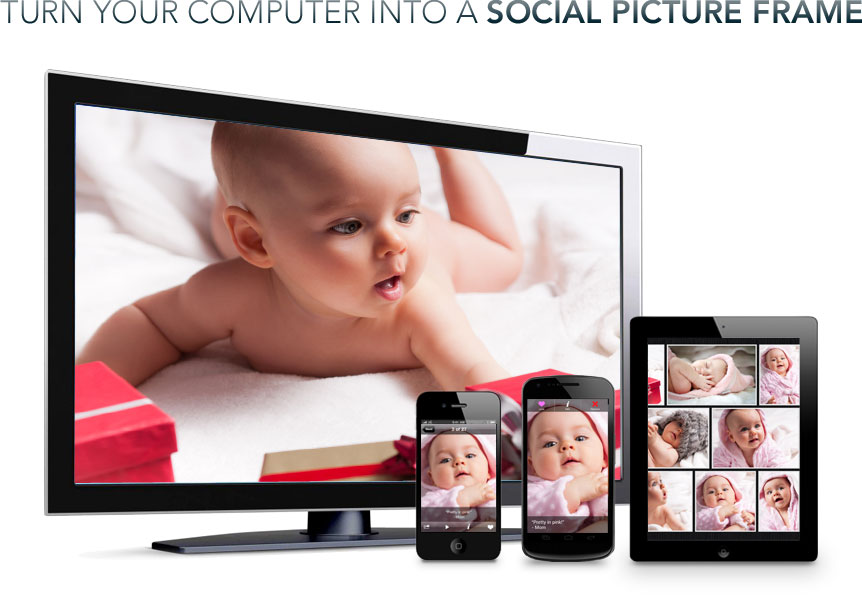
A new site called Familiar offers one way to get your photos off your hard-drive and into your line of vision, as well as providing a social forum forum for photo sharing.

What you do is sign up with a number of friends and family (guess you could do it with strangers, Chat Roulette-style). Familiar’s software allows you to share your photo albums or Facebook, Picassa, SmugMug and Flickr photostreams with people in your Familiar circle. The combined photos are then displayed as your screensaver of your computer monitor, iPad or Kindle Fire. You can even send photos instantly from your iPhone or Android.

While most computers can turn you screensaver into a slideshow, they don’t have the social aspect, which provides some novelty and a way of keeping in visual touch with you friends and family.

Of course, your computer has to be powered on, and computers don’t always make the best picture frames. That said, most of us keep our computers on standby much of the time and because Familiar is free and uses existing hardware,  a zero-investment, imperfect picture frame is far better than none.

If you have other suggestions for viewing digital photos, let us know.

via Netted by the Webbys

Combating the Attention-Span Crisis

Just as excessive consumer goods can make our lives more cluttered and complicated, excessive stimulation can make our minds restive and unsettled. And few things deliver excessive stimulation like online media, computers and mobile devices. We text while we pop through our 30 open tabs while we email while we cook dinner.

We came across this 15 min talk by tech entrepreneur and investor Joe Kraus, who explains how our phones and online activity is eroding our already threadbare attention spans. He explains that the human mind cannot multitask–that it shifts its attention from one thing to the next, but it does not and cannot pay attention to more than one thing at a time. Moreover, the more often we shift between various stimuli–i.e. multitask–the dumber we get (-10 IQ pts.) and the harder it becomes to shift in the future. As he says of multitasking, “It’s one of the only things where the more you practice it, the worse you get at it.”

He touches on several other topics like manners and possible solutions to this “crisis of attention” such as weekly media fasts and his SlowTech movement.

In addition to Kraus’ suggestions, here is a comprehensive list from artist/programmer/activist Steve Lambert of online tools that restrain our compulsion to multitask:

  • Self Control. This Mac or PC plugin enables you to block access to email and select websites for a set amount of time.
  • Freedom goes one step further and shuts down your online access altogether for a set time.
  • ColdTurkey blocks access to distracting sites for Windows OS.
  • Spirited Away automatically hides windows you’re not using anymore.
  • Vitamin-R hides applications, uses a timer, encourages goal setting and focus.
  • Concentrate blocks sites, allows sites, launches and quits apps, and more (but you can disable it) by Rocket Software. Free to try, then costs, and not open source.
  • RescueTime scheduled, timetracker, etc.
  • FlexTime is a versatile timer for repetitive activities.

Online media, computers and mobile devices are integral and invaluable parts of our lives. But in a certain way, because they have been introduced so fast, we haven’t had time to cultivate smart habits around their usage. Our primordial minds’ default setting is to get more stuff and receive more stimulation; to think that this setting would be overridden in the 15 or so years we’ve been online is mistaken.

But with consciousness and smart tools, we can start reigning in our attention and edit out useless stimulation for quieter, happier minds.

via Joe Kraus and Steve Lambert