Get More Fit with Less Time and Equipment

There are few things that can reliably improve our health and happiness like regular exercise. But for many of us, exercise occurs as a chore–a boring, time and logistic intensive affair that we might have the same level of enthusiasm we would have for an all you can eat rice cake buffet. But the fact is we can get pretty fit in very little time with little or no equipment. A few months ago, I explained how you might be working out all wrong, focusing on duration rather than intensity of exercise. High intensity interval training (HIIT) is something I’ve practiced for the last several years, however I’ve almost always done it in a gym. But with two small boys occupying much of my free time, getting over to the gym, even for an hour, has been a far more complicated affair than days past.

Rather than totally resign myself to acquiring a “dad bod,” I decided to find ways of staying fit that didn’t require a round trip to the gym. The fact is there are many great exercises that involve little or no equipment or special spaces.

In the past, I wrote about the Seven Minute Scientific Workout app. The app and workout are solid (especially if repeated), but there’s not much variation in the workout. In my search for something more comprehensive, I discovered 12 Minute Athlete, a website that offers numerous HIIT workouts via Youtube videos, a free ebook and iOS and Android apps that guide you through simple, minimal or no equipment exercises and routines. There is also a subscription based intra-app training program called “Super Athlete.”

The workouts are not all 12 minutes; some are shorter, some a little longer and some are done to time, for example the first weekend of the month 12 Minute Athlete founder Krista Stryker puts out a 100 burpee challenge, which asks people to perform 100 burpees in as little time as possible (I’ve been a bit too chicken to take the challenge just yet).

I consider myself to be a bit above average fitness and I found that many of the exercises and routines, when done with proper intensity, were pretty challenging–a good thing if you’re looking to do a lot with little time. 

I emailed a few quick questions to Krista to ask her about her site and the philosophy behind it. Here’s what she had to say. 

David Friedlander: What motivated you to start 12 Minute Athlete?

Krysta Striker: I was one of those people growing up that never really considered myself athletic. Sure, I played team sports (basketball and soccer mainly), but I never really felt I was that great at them, and the moment I went off to college I pretty much stopped doing anything active at all and turned into quite the couch potato, assuming I was destined to be a bit pudgy and weak for the rest of my life.

Towards the end of college I was feeling pretty lost and hopeless with no idea of what to do with my life, and started exercising a few times a week partly because my mom told me it would make me feel better. It worked, and I surprised myself with my strength and how quickly I went from barely being able to do a single push up to working up to more difficult exercises like pull ups and triceps dips. I liked feeling strong, and my confidence levels skyrocketed in all areas of my life, which eventually led me to study for and receive my NSCA CPT certification [personal training].

At that point, I started working out for hours a day, diligently doing my cardio, weight training and sports-specific training every day until I was overtrained, injured, and had little time in my day to do anything else. But even though I was spending so much time working out, it felt like it was never enough.

That’s when I discovered HIIT training and everything I knew about fitness and exercise was turned upside down. Not only did I get leaner and fitter in a shorter amount of time, I got stronger and more confident than ever before. Before long, I was able to do feats of exercise I never before thought possible, such as handstands, pull ups, and completing 100 burpees in nearly six minutes flat—and still have the time and energy for a hike, bike ride or long walk later in the day.

It was after my own personal successes that I created 12 Minute Athlete so I could share these incredibly effective HIIT workouts with the world and help people of all fitness levels ditch their excuses and get in shape in as little time as possible.

DF: What would you say to people (like me) who are accustomed to going gym about doing app based workouts?

KS: Going to the gym is great if you enjoy it, but not everyone has the time, so doing app-based workouts like the ones in the 12 Minute Athlete app just give people more freedom to work out anywhere. You can still work out in the gym if you wish, but you can also work out in a nearby park, your apartment, or even a tiny hotel room if that’s all you have.

DF: Many of your routines are fairly advanced. what would you say to people looking to start out who might not be quite ready for a pistol squat [see below], pull up or burpee?

krista-pistol

KS: Everyone has to start somewhere! When I first started working out I couldn’t do a single push up, let alone a pull up or a pistol squat. If you can’t do a pull up yet, try flex hangs instead, where you’re simply holding onto a pull up bar for as long as you can to build up strength (it’s harder than it sounds!). The same goes for exercises like pistols and even push ups—simply find the hardest version of the exercise you can do now that still pushes you past your normal comfort zone. The key is to work as hard as you can and modify anything you need to in order to get started.  

See more at 12 Minute Athlete

Can Tech Combat Tech Addiction?

There is a new software system called Phylter developed by a group of scientists at Tufts University. Phylter is meant as an accompaniment to wearable tech, which poses the risk of non-stop notifications of texts, emails, twitter updates and the like. The software uses functional near-infrared spectroscopy to monitor brain activity, which detects whether you’re deep in thought. The system restricts notifications accordingly–if you’re deep in thought, it’ll cut off notifications; if you’re not deep in thought, it’ll send away. As said in New Scientist, you could use the excuse, “SORRY I missed your call. My brain said I was busy.”

It’s a nifty and logical idea, one that is meant to fight the scourge of multitasking. PSFK reported that a study found multitaskers “reported twice the anxiety, committed twice the number of errors, and required up to 25% longer time on a primary task when interruptions arrived during rather than in-between tasks.” As has been said, “Multitasking is the act of screwing up multiple things at once.”

But will Phylter work toward stopping our technology-aided multitasking tailspins? Speaking more broadly, can any technology effectively limit our use of technology?

My experience is no. I have tried to block out sites or web access using the Self Control and Freedom apps. I have tried RescueTime, which monitors web activity, thereby cultivating awareness of my multitasking ways. All of these systems yield the same initial enthusiasm and burst of focus, followed by a cessation of use and/or ignorance of results.

To me, using these apps feel like going on a diet where I’m always resisting the urge to do things that compromise my health and happiness. But if there’s a bag of chips in the house during my diet, I tend to eat them. Likewise, if I want to be distracted and there’s the means to do it, I am going to.

In general, the best way for me to avoid technology is by not having it–either leaving it at home (which, frankly, usually happens by accident), being fully engaged at some event or being out of cell/wifi range. The other method–the one that works most consistently and is most feasible given my professional tech dependence–is not starting down the multitasking path at the beginning of the day. Just as it’s easier for me to eat no chips than it is to eat one, it’s easier for me to never indulge multitasking than it is to reign it in.

But that’s just me. What do you think? Can certain technologies effectively combat the multitasking that other technologies often incite? Have they for you? Let us know in our comments section.

App Shows You Where All the Time Goes

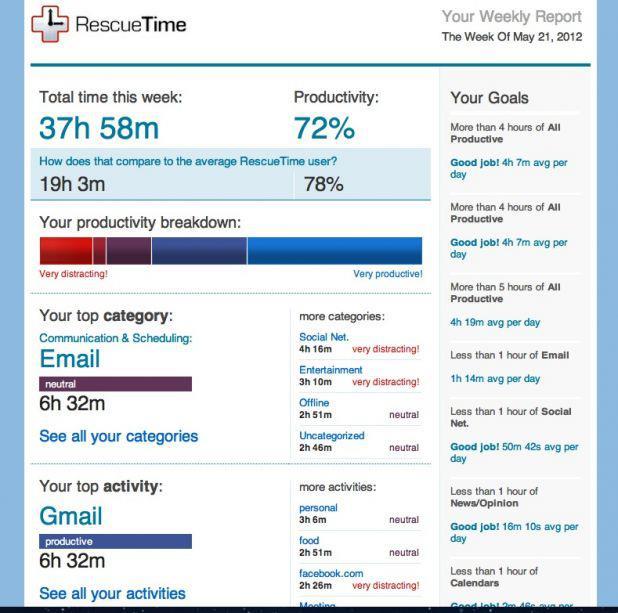
Awareness can be a bitch. For example, it’s one thing to have an intellectual understanding that factory farming is bad based on articles and some statistics. It’s another to visit a factory farm or see one of those gnarly PETA videos. Unlike the heady intellect, awareness is visceral and far more likely to impact our behavior. Similarly–though far less horrifically–we can intellectualize how we fritter away time on activities that add minimal value to our lives, but until we see the cold, hard data, until we become fully aware of the impact of our time-wasting, those concepts will, in all probability, fail to inspire change. If you are committed to making the most of your time and life, if you want to see the truth–even if it’s a little or very uncomfortable–an app called RescueTime might help.

Many of us spend a good deal of our waking hours on computers. As we discussed the other day, some of that time is put to good use and a bunch of it is not. RescueTime promises to “Measure Your Digital Life,” giving us a breakdown of where exactly we’re putting our time when we’re on our computers.

Setup is easy. Just download the RescueTime app and enable it to monitor your computer’s activity (also available as a browser extension). RescueTime Lite is free and allows you to categorize which types of sites and applications are productive and which are not; for example, I listed “Design and Composition” as productive and “Entertainment” as not productive (it does not account for sites that start off productive, but devolve into unproductive, like Huffington Post). There are also neutral sites like Google.com. You can set daily time goals for each, e.g. a goal of logging five hours on productive sites and apps and a goal of limiting yourself to one hour on non-productive ones.

RescueTime also has a Premium version which gets more detailed about your time usage data. It can give you hour-by-hour reports of where your time goes. It will monitor your computer activity and if you take off for a while, it will ask you what you were doing and allow you to manually log your activity. It allows you to block distracting websites, it sends push notifications for various goals and statistics and features a host of other productivity-enabling features. It costs $9/month or $72/year.

RescueTime is available for OSX, Windows, Linux and Android operating systems. It’s available as a Firefox or Chrome extension as well. You might notice it is not available for iOS, which might be limiting for those who frequently use their iPhones or iPads.

As Ben Franklin once remarked, “Dost thou love life? Then do not squander time, for that’s the stuff life is made of,” but many of us aren’t aware that we squander time or the extent to which we do. RescueTime helps us see where our time goes, thereby cultivating the awareness to make the behavioral changes that will put it to better use.

Handheld, Mobile Enlightenment

Even the most edited lives can be packed with stress. Work, family, ubiquitous technology and all the other stressors of modern life can make us feel like we’re floating in a sea of anxiety. And while many of us have the best of intentions to remedy this feeling with regular meditation, the opportunity to put butt to mat or chair and get present often alludes us. Meanwhile, most of us are seldom without our smartphones. An app called Buddhify 2 does the unthinkable: marrying our desire to be more mindful with our constant clutching of cell phone.

The mobile app features a wheel with various categories of guided meditations, e.g. one for connecting after being online or one to use after waking up. Each category has various types and times for the meditation. There is a solo feature for a general, self-guided mediation. The app also allows users to track their state, time and various other metrics for tracking progression toward Buddhahood (watch video for more details).

We’re not sure if a Buddha would use a mobile app on the path to enlightenment, but we suspect he or she would not object to it–anything, app or otherwise, used with the right intention, can be the right tool for achieving bliss. Moreover, many of us need all the help we can get, battery-powered or otherwise.

The app is available for iOS for $1.99  on the iTunes Store (an older version is also available for Android).

Via Lifehacker

Devotion to this Guru Saves Travel Time

In the next few days, many of us will find ourselves taking to the skies en route to family fun (or obligation). With winter weather and crowded airports to navigate, there are a host of variables that can add hours and stress to your travel plans. A free app called GateGuru for iOS, Android and Windows Phones takes a lot of the mystery–and headache–out of air travel.

GateGuru has several functionalities that allow you to confidently venture forth using the most current information about your flight and airport. One is the JourneyCard, which shows “high level” information like airport weather and scheduled departure times.

The FlightCard shows specific up-to-date info about your flight such as departure and arrival times, gate info, baggage carousel info and even estimated security wait times. This function is a great one-stop-shop where normally we call the airline for flight current flight info, write down–then subsequently lose–arrival time and terminal details, and have no idea how long security is until we arrive at the airport.

Other features include a list of amenities at your airport like restaurants and shops (spoiler: most of them are overpriced and not that good). GateGuru has a partnership with Avis rental cars, allowing on-the-fly bookings with that company via the app. And GateGuru will show your travel-stats–miles traveled, frequent-flyer info, etc.

Part of living an edited life is eliminating unnecessary steps wherever we can. While some of us find a certain serendipitous glee spending 10 hours in an airport waiting for our flight to leave, meeting new friends, eating Quiznos and so forth, most of us would rather be doing something–anything–else. GateGuru holds the promise of editing our travel times this holiday season and beyond.

Via Netted by the Webby’s

Four Tools to Replace Common Items with Your Smartphone or Tablet

50% of Americans own smartphones and 20% have tablets. While most, if not all, of the smart-phoners are the tablet owners as well, any way you look at it, that’s a lot portable technology.

Given that so many people have these devices, why not exploit them to their full potential? Beyond obtuse apps for blueprint design and augmented reality games, there are a number of apps that turn your smartphone or tablet into common household items, saving space and money. Here are a few:

  1. Scanner. After our post the other day about essential items, a couple commentors suggested using an app for scanning rather than a clunky machine. Camscanner and Scanner Pro allow you to take photos or screenshots on your smartphone/tablet and turn them into jpgs or PDF files (Scanner Pro is iOS only).
  2. Books. No matter where your eBook collection is (Kindle, Nook, iBooks), there is an app that allows you to read your from any smartphone or tablet. While the idea of reading on your phone’s tiny screen might seem strange at first, it’s quite easy to get used to and the convenience of always having a book on hand can’t be beat.
  3. Universal remote control. For $60 or so, products like UnityRemote by Gear4 (iOS) or Beacon by Griffith Technology (Android and iOS) will turn your smartphone and tablet into a universal remote for your entertainment system. Beyond consolidating devices, the more intuitive interfaces of smartphones and tablets make set up and use simpler than standard universal remotes. The one downside is you probably want to keep one of those devices by your entertainment system at all times. This might argue for having your device as a supplemental remote or having a dedicated device such as an old iPhone or iPod Touch; this is also a good place to send media from for Airplay-enabled stereo systems.
  4. Flashlight. Most of us keep one of these around for the odd hurricane. Then we look for the flashlight when that emergency arrives and find its batteries are dead. Since most of us have our phones on us and charged at all times, they make perfect flashlights for emergencies and occasional use. There are a number of flashlight apps for iOS and Android that use the screen and/or camera flash as a flashlight. Most include strobe lights for side-of-the-road breakdowns or impromptu discos.

What other apps replace common household items? Let us know in the comments section.