Product Review: ScanMyPhotos.com

Right after high school, I was a bit of a shutterbug. Forgoing college for a few years, I traveled the world, always packing small autofocus cameras and large stashes of film. I took hundreds of shots of varying quality that captured these amazing times. Through several moves and a couple decades, these photos ended up in a Wheaties box stashed deep in my folks’ crawlspace. A few years ago, I selected a couple hundred of my favorite photos from this Wheaties box and put them into another box that once held a Motorola Razr–these became effectively all of my non-digital photos (the Wheaties box is somewhere in the crawlspace I suppose).

I still have an emotional attachment to these captured moments, but not a physical attachment to the paper photos themselves. I planned to digitize them long ago, but never got around to it. I finally decided to do it, using ScanMyPhotos.com–the decision based on a post I did about photo digitization (full disclosure: they offered me a promotional box when I asked for one). What appealed to me about ScanMyPhotos was their flatrate package. They send you a preposted, medium-sized USPS Priority Mail box, which you stuff with as many photos as you can. My photos only filled up a fraction of the box, but ScanMyPhotos president Mitch Goldstone said the box can easily handle 1800 photos. They receive the photos and send back the originals and a DVD with the digital image files. For those, like me, who don’t have an optical drive, they’ll send a thumb-drive for an extra $13. This whole process only takes 5-10 business days (mine took 5).

You can get the images scanned in either 300 or 600 dpi resolution ($145 and $235 per box respectively). They hooked me up with the 600 dpi service, but truth be told, if I were spending my own money, I would have opted for 300 dpi; 600 is really only needed if you’re blowing something up to very large size.

00000076 copy

The scans came out great–or rather the great photos, of which there were many, came out looking great. Several of the photos had smudges and scratches, which the scans reflected. This leads me to cautionary note: If you go this route, be sure to inspect your photos before you send them in. Also, send them in sooner than later–as I found out, photo paper quality does not improve with time.
IMG_3931 copy

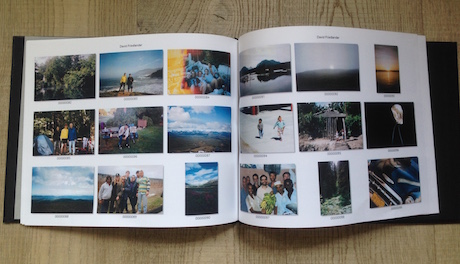
ScanMyPhotos also included in my order a bound book with thumbnails of my pictures on paper so I can thumb through the images ($175 extra). This is a very cool feature, though had I known they were going to include it, I would have sorted my photos out chronologically. Because I sent them a jumbled mess of photos, the images jump around in time quite a bit. That said, it’s handier than looking at them on a screen and the 8.5” x 11” book is far less bulky than a photo album and there is zero cellophane.

Another interesting add-on is their photo wash, which enhances and sharpens old faded shots ($70 per box). Most of my photos were less than 20 years old and weren’t too discolored, but I imagine the photo wash would help greatly in preserving older photos that have been ravaged by fading.

I still haven’t scrapped the original photos, but don’t see why I won’t. I don’t look at them save for a couple times a decade. The rest of the time, they just take up space. I suspect I am more likely to look at them if I post them online or even if they’re just hanging out in my digital library.

About cloud storage and sharing, Goldstone points to how ScanMyPhotos compliments Google Photos, which allows unlimited cloud storage, facial recognition, easy sharing and much more. He notes how cloud storage, like Google Photos or Facebook, has mostly been focused on backing up files that are native to digital devices, which for most of us has been the last 5-10 years. But he estimates that the average household has around 5500 photos–pre digital photos that represent a disproportionate percentage of our personal histories. If you’re looking to preserve and share your pre-digital photographic history while enjoying the clutter-less security of digitization, ScanMyPhotos is a good way to go.

Evernote Scannable and Finally Ditching the File Cabinet

Evernote is a centralized, searchable, web-based place to store all of your notes, web articles, PDF’s–kinda everything. I’ve been using it for a few years, primarily for its web-clipper feature, storing the miscellaneous stuff I find online that I might not immediately have a use for, but want to keep a record of somehow. Evernote grabs the text and image for the webpages and I can write notes and tag so it’s easy to find for future reference. For example, searching the “micro-apartment” tag in my Evernote will bring up every article related to the topic.

But web-clipping is just the tip of the Evernote iceberg. You can store all types of files, documents and photos, making Evernote the equivalent of a jacked-up, cloud-based, searchable file cabinet.

Their new iOS app Scannable goes even further, virtually abolishing any need to hold onto any physical files. By granting Scannable permission to access your photos, it will detect any document you shoot–receipts, documents, biz cards, etc–and make them into scans which are easily exported to your Evernote account (there is a manual mode if you want to select what gets scanned).

In order to use Scannable, you need iOS 8 (I had to make the upgrade). All you do is open the app and the camera’s viewfinder hunts for a document in its field of vision. I tested it on a bank statement and business card. It made clear scans, which were easily sent to Evernote, where I could make notes should I need to find the s in the future. But you can also send the scans to your camera roll, Twitter, Facebook, Airdrop, printer or a host of other options. With business cards, Scannable extracts all of the contact info and makes a contact note; you can create a new contact in your phone from the scan or associate it to an existing contact. You can even connect Scannable to your LinkedIn account and it’ll connect the contacts it generates through that platform.

Historically, I have used the TinyScan app that uses a phone’s snapshots to make PDF scans like Scannable. I then send the scan in an email or upload to Google Drive, Evernote or Dropbox. It’s super handy, but not “smart” in the way that Scannable is. With TinyScan, a scan is a scan, whereas Scannable sees a scan as data.

While many of us might still cling to the feel of paper books and notepads, it’s tough to be romantic about document storage. It creates a lot of clutter for something we “might” need some far off day in the future–a day that almost never comes. Apps like Scannable provide a profoundly easy way of covering our posteriors for posterity, creating an organized, searchable, clutter-free storage system, driving one last nail in the coffin of paper document storage.

Thanks for the tip Steve

Betabook: The Notebook for the Digital Age

While the digital world offers many replacements for items like books, receipts, calendars and other clutter-creating paper goods, sometimes the digital versions can leave us longing for the tactility of yesterday (well not the receipts). If you’re a scribbler or doodler, the Betabook might offer a nice middle ground between lightweight digitalism and tactile goodness.

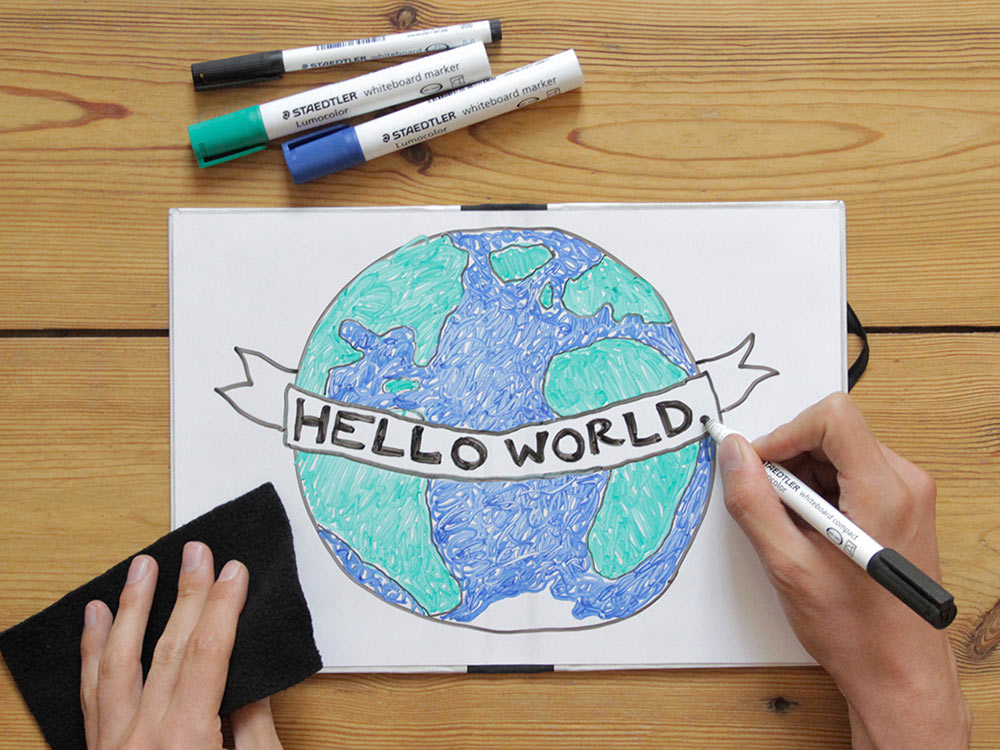
The Betabook is essentially a portable dry-erase board designed to be used in concert with your mobile device. Betabook inventor Jay Cousins found that of the many notebooks he filled out, there were only a few items worth saving. Rather than having a complete paper archive, giving equal real estate to good and not-so-good ideas (alpha and beta, if you will), he wanted to make a notebook that would enable you to parse out the good ideas and clear out the others.

You can take a snapshot with your phone of the ephemeral contents of the Betabook. If it’s a decent idea, you have a volume-free digital archive with the pic. Even if it’s a lousy idea, sorting through digital files is an easier task that rifling through countless paper notebooks.

Betabook_02_small

Cousins sent me a Betabook to try out for a bit. It was the smaller of the two sizes (8.3″ x 11.7″), which is roughly the size of a Molskine notebook, but far lighter. Admittedly, I’m not a prolific scribbler or doodler, so I wasn’t necessarily the ideal tester. I mainly use notebooks for, well, notes; the marker included wasn’t necessarily ideal for writing text (I used to be on the debate team, so my script runs on the small side).

betabook-fire-truck

However the Betabook became a staple in my bag of tricks for entertaining my 2.5 year old son. At home as well as on several long train rides, we drew countless fire trucks. The whiteboard was easily wiped completely clean, making various drawings of fire trucks easy to replicate. I liked the fact that I wasn’t using a bunch of paper for drawings whose novelty wouldn’t last as long as an airplane contrail. In fact, Cousins estimates a Betabook, if it replaced 1000 sheets of paper, would spare ⅛ of a tree per year.

If you want to get a Betabook, visit their Kickstarter campaign page. They’ve already received $60K of their $15K goal–a decent index for a good idea. A $30 pledge will get you their basic book, pen and wipe cloth.

Live with Other People, Better

Finding good roommates is hard enough, but then you have to live with them. There are a million things that can strain the best of roommate situations: remembering who cleaned the fridge last, keeping on top of shared bills and so forth. A new venture called Chored, seeks to reduce some of these tensions with mobile technology. Through a crowdunding campaign, Chored is looking to make an app that digitizes the more contentious aspects of inter-roommate relations. Through the app, bills can be set up on an online account, split and paid through Paypal. Chores can be setup, assigned and tracked via the app as well. You can allocate “ad hoc tasks” such as getting toilet paper and note who did it and paid for it. If used–and that’s a big if in our minds–Chored could mitigate or eliminate much of the random grievances that make roommates resent each other (or it could amplify them I guess).

As we’ve said before, house-shares are often as (or more) space and cost efficient as micro-housing. But many people will pay a hefty premium to live alone rather than deal with common roommate-induced headaches. Living with people–even ones you like–can take a lot of effort and require systems to keep things running smoothly. Some of the best roommate situations I ever had were also the most regimented and rule-intensive. But most of my roommate situations were in a time long, long ago when not everyone had a smartphone. I could see how having a digital log of who did what and when could help people live together better. Time will tell whether: A. Chored gets their funding, B. people will use it, C. it’ll help people live together better.

If you currently live with a roommate/housemate, or successfully lived with one in the past, what systems did you use to keep things running smooth? Let us know in our comments section.

Thanks for the tip Sam

The Last Password You’ll Ever Have to Remember

Securing your valuables looks a lot different in the digital age than it did in the analog one. You used to be able to stuff your gold doubloons in a chest, lock it up and you were all good. Nowadays, in order to have a truly safe existence–keeping your bank, credit card, email and other accounts safe from being hacked–you need to create many, complex passwords for every site you register with. It is very likely that one of the companies that you do business with will get hacked in the next few years. If you use different passwords, the fact that Crazy Bob’s Shack of Discount Fireworks got hacked won’t suddenly compromise your bank login.

But who has the time, the memory or the organizational capacity to keep track of so many passwords? Most of us just say screw it and use the same logins and passwords over and over again, hoping we’ll be spared when some cyber-attack hits.

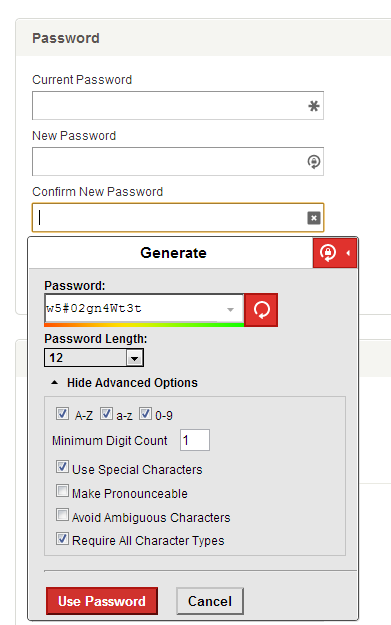
An app called Lastpass has an elegant solution for those of us who are too lazy and disorganized to properly protect our online existences. Lastpass will save all of your passwords in a cloud vault and autofill your login and password info when you visit a website. The only password you’ll need to know is the master password to access to Lastpass. Lastpass is fundamentally a security company, so the password vault has some very interesting security. If you are into technology, you might want to read Is LastPass Secure?

lastpass-gen

Lastpass will import all of the insecure passwords you have stored on your keychain (I had a shocking 171). Through a Lastpass extension which works with most browsers, a form will appear that will autofill existing logins and also allow you to create new complex logins and passwords for new sites, which Lastpass will save. To make new passwords for old sites, you will have to go into settings and replace passwords with new, Lastpass ones (which are infinitely better than “Petname1”); this is a little labor intensive, and might require you to update a few passwords on your phone (email, Facebook, etc) but once it’s done, it’s done and you’re far safer for it. The free version will autofill logins and passwords on your computer and there is a mobile-ready premium version that sells for $12/year.

Get Fit in 7 Minutes Flat

The combination of a recent move, a succession of junk-food-filled holidays and an unusually harsh winter have wreaked havoc on this author’s exercise regime and fitness level. A couple weeks ago, I ran across an app called Quick Fit, which promises mobile-ready fitness in a mere seven minutes. After two weeks of contemplation, I finally took this short journey to a better body.

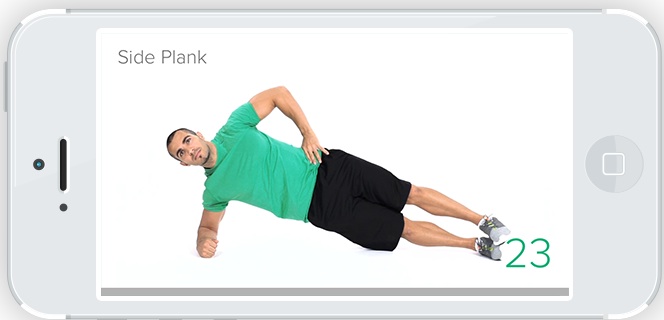
The app’s workout was called the “scientific 7-minute workout” by NY Times and was developed by the American College of Sports Medicine. The routine is based on the growing body of evidence that suggests intensity, not duration, is the key to improved strength and cardiovascular fitness.

The workout includes all the staples of unweighted exercise: pushups, crunches, lunges, plank poses, etc. The only piece of equipment is a chair. While some of the exercises might prove challenging to some, they can all modified for less intensity: bent knee pushups and planks, partial lunges, etc.

Again, the key to the workout is intensity. Each of the 12 exercises last 30 seconds with only a 10 second rest. I consider myself moderately fit, and by the middle of the workout my heart-rate had noticeably increased. Had I pushed myself harder, it would have been all the more effective. Adding one or two circuits would have made it an even more complete workout and still kept the duration quite short.

The app has a nice clean interface with a semi-robotic looking personal trainer doing the exercise along with you. It has an exercise tracker and voice prompting, which can be turned off. The app costs 99 cents on iTunes. There’s an ab workout that costs and additional $1.99 (all a lot cheaper than a gym membership). There is also a free web-based version (above) if you want to give it a try or just plan to do it on your desktop.

A quick search after I made my purchase shows that there are a number of similar apps, many of which are free.

While many, author included, actually enjoy exercising, sometimes we don’t necessarily do it with the utmost efficiency. Likewise, our routines often get derailed–we’re away from our park or gym, we are particularly busy, etc. Quick, intense workouts like the one Quick Fit provides can both streamline our normal routines and provide an easy way to maintain fitness when time and circumstances are less than cooperative.

via Swiss Miss

Store Your Books in the Cloud

Books are great. They are instigators of imagination, chroniclers of the ages, companions in meditation and erudition. They are also some of the clumsiest, heaviest, most space-intensive objects most of us carry. When this site first started, we presented what we called the “bibliophiles dilemma,” which explained the resistance many of us have in giving up our paper bound books for ebooks, a format where hundreds of volumes can fit on a device that fits in our pocket. The good news is that we don’t have to choose: we can have hybrid collections, retaining some of our favorite paper books while regularly circulating through ebooks.

Oddly enough, one of the ebook’s bigger drawbacks is expense. Because companies like Amazon are the gatekeepers of protected book files, it’s tough to buy titles for cheaper than retail without resorting to extra-legal tactics. Similarly, it’s near-impossible to share in the way you can with a physical book.

For the ebook-reading book lover, here are a few options for getting your book fix without breaking the bank.

  1. Amazon. The Kindle Owners’ Lending Library is offered as part of an Amazon Prime membership. With it, you can access one title per month from a library of 350K titles. It’s only available on Kindle devices, which for many is not a problem. There’s is also a loaning program, where you can send a title once in its lifetime to a friend for 14 day period (kinda lame). This program works on any Kindle app enabled device (iOS, Android, desktop). Amazon also has tons of free titles.
  2. Scrbd. For $8.99/month, this service gives access to “thousands of best-selling books” as well as user uploaded articles, stories, etc. They have been called “the Netflix of books.” Scrbd is browser and app based, so you can read on your desktop, iOS or Android devices (i.e. not Kindle or Nook).
  3. Public Libraries. Many libraries like the NYC public library are offering ebook checkouts to local members. Overdrive.com is a portal for over 27K libraries to see if your local library provides ebook lending.
  4. We ran across a number of other sites such as Open LibraryeFling and ManyBooks, but titles were often ones with expired copyrights (i.e. old). There were also sites like Lendle, an Amazon affiliate that makes Kindle lending easier, but the functionality didn’t seem that much better than Amazon’s lending program.

If you have further suggestions for great, legal, book sharing services, let us know in our comment sections.

Pile of books image via Shutterstock

Company Makes Some Serious Coin

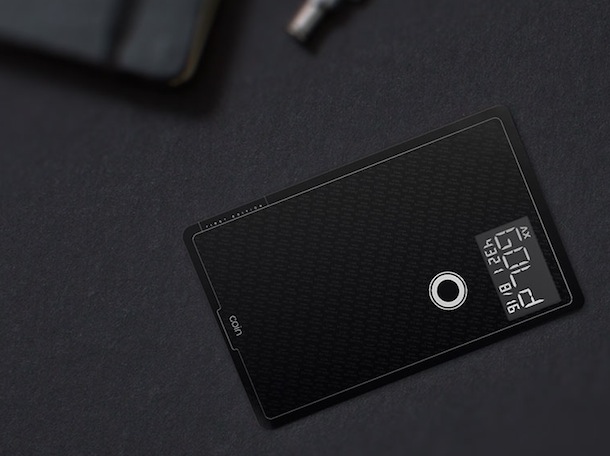
Many of us carry around several cards in our wallets: a personal credit card, debit card, business expense card, family account card, award card, etc. This stockpiling of cards leads to bloated and cluttered wallets. A startup called Coin has a solution to this wallet obesity epidemic. They make a slim little card that is programmable to act as all of your cards.

Via a smart phone card swiper and app, Coin takes information from your existing cards and loads it onto their card. You also take a picture of cards to have identifying pictures. When you’re ready to make a purchase, simply scroll through your available cards on your Coin device, select the one you want to use, and swipe.

Coin also features a Bluetooth signal that sends a push notification to your phone should you and the card be separated.

Coin is pretty cool, though we do have questions about its longterm relevance. We imagine it won’t be long before all of our spending power will be accessible via smartphone apps such as Google Wallet. We also think a great feature would be to show your balance, given that there’s an LCD screen. This might encourage more responsible card use, avoiding the “credit card premium” we mentioned the other day.

All that said, that fact is that most of us carry and use multiple cards, and Coin makes managing and storing those cards a bit easier. Coin will be delivering summer of 2014. Friday, December 13 is the last day to receive Coin’s half-off promotional pre-order price of $55. Visit their site for more details.

Minimalist Gift Idea: Personalized Thumb-Drives

We’ve said it before, but the holidays can be a vexing time for the minimalist. We want to perpetuate the spirit of giving, but don’t want to give a bunch of stuff that will likely go unused or straight to the closet, donation center or landfill. If you’re looking for a simple gift that is thoughtful, thrifty and useful, consider thumb-drives.

We’re not just suggesting that you give blank thumb-drives that, while useful, lack any personal touch. When giving out the drives, load them with pics, music mixes, letters, artwork, videos, etc; we suggest that these things be as personal as possible (and on universally recognized digital formats). The gift might lack some of the initial jolt of excitement of some gifts, but if you’re digital content is made with care, people will love your gifts. It’s amazing how far a little time and thought–e.g. a heartfelt letter–goes toward creating a memorable and appreciated gift.

After the gift has been given and (hopefully) appreciated, your recipient has a useful thumb-drive. We found a ten pack of 8 gig thumb-drives for $54. You can get cheaper ones, but spending a few extra bucks for more memory will increase the probability of the drives being used in the future by the gift recipient.

If you have gift ideas that are minimalist-friendly, please email us or let us know in our comments section.

What Do You Do With Those Old Photos?

Few things are more heartwarming than going through your old photos. You get to see an illustration of where you’ve been–along with laughable hairstyles and clothing.

But when do most of us go through our old photos? When we’re moving, of course. We take these strolls down memory lane in between packing boxes. We reminisce, decide we can’t just chuck out our pasts and seal them back up in boxes. We repeat this process in 5-10 years when we move again.

You want to keep a record of your life, but stashing photos in a box for decades and shifting them from one storage space to the next gets expensive and complicates your life. It’s also not that great for the preservation of the photos. And say what you will about digital photos, but they are far more portable, allow easier access should you want to peruse or print them and don’t yellow and crack like their papered brethren.

While scanning photos yourself is possible, it’s a pain that most of us don’t want to endure. Here are a couple affordable services that do high-quality digital conversions of your old photos (note: this is for 4″ x 6″ photos. Optional services include scanning negatives and other formats. Prices vary.)

  • ScanCafe charges $.29/scan at 600 dpi. What’s nice is they allow you to pick and choose which shots you want to keep before charging. They also add a Value Kit which gets the price down to $.22/scan; there’s a longer turnaround and they scan everything you send rather than letting you pick and choose. Shipping and color correction included.
  • Scan My Photos sells you a 11″ x 8.5″ x 5.5″ box to fill with as many photos as you want. 300 dpi runs $159 $99 and 600 dpi is $247 $189. Postage for returning photos is included, color-correction is not.

There are many other vendors, but most of their pricing begins at $.35/scan, which adds up quick. And while the above might seem like a lot of money, consider the cost of carrying around your old photos, the inaccessibility of photos stashed away in your basement and the eventual loss when the photos yellow, curl and die.

If you have other suggestions for photo-digitization, please share them in our comment section.

Note: This post originally posted last year, but due to frequent questions about photo digitization, we thought we’d repost. 

image credit Pack Peddler’s Place